Tuesday, September 11, 2012

Bananas about Scientific Writing

One of the things that's really exciting to me about Common Core this year is how well it integrates with content teaching for Science and Social Studies. Now that I'm a working mom, I really appreciate anything that allows me to hit multiple subjects and standards at once, and last term, I found myself pushing a lot of informational writing into science.

During our first week of school, I was covering science process standards before launching into our first unit on ecosystems. One of the first activities that we did involved writing about bananas.

In the few days prior to this lesson, we spent some time looking at and talking about science notebooks and the importance of recording our thinking. We took a look at some examples of real science notebooks kept by actual scientists (Note: as I write this blog, the sciencenotebooks.org website appears to be down. I really hope this is a temporary thing because it was a tremendous resource!). For this day's lesson, I asked my students to get out their inquiry notebooks, and I gave each student a banana. They were instructed not to eat their banana, but instead, they were to observe and describe their banana in their notebook.


During this first wave of writing (3-5 minutes), students gave very similar descriptions such as "long, yellow, brown spot," etc. 

We shared descriptions at our tables, and then I asked the class how many students felt like they could identify their banana based on their description if I collected all the bananas from the tables and mixed them up. Only a couple of hands went up. We then talked about what kinds of information and details would be helpful to do that and started a list.


What really came out of this discussion was the idea that we needed to focus on unique characteristics. Everyone had a general idea what a banana looks like, but details such as having a brown spot in the shape of a heart approximately 2 inches from the end of the banana sure went a long way in helping us identify the banana in comparison to "long and yellow with brown spots."

I then gave them time to revise their descriptions. Some students traced their banana in their notebooks and then added details and markings from their banana.

Other students asked to get out tape measures to be even more precise in their details and descriptions.

At the end of this revising time, I had students mix up their bananas between two tables and trade notebooks with another student to see if the other person could identify the correct banana based on the description. It was a great check to see if the details were descriptive enough so that others beyond the writer would understand them. If the correct banana wasn't identified, the students made suggestions for additional details that could be helpful.

What I loved about this activity was how it really got us thinking about interesting details. It's the kind of anchor lesson that we can refer to in all types of writing when we talk about spicing up our writing and good word choices. The bananas were inexpensive, and of course, we ate them at the end of the lesson. 

Do you use science or inquiry notebooks in your classroom? What are some strategies you use to help your students write in science? I'd love to hear your thoughts in the comments section!

Monday, September 10, 2012

Secrets Buried Amidst Piles of Papers

It's Monday, but I am happy to report that I am home this week enjoying my fall break. My district has a pretty sweet calendar where we have a one week break at or near the end of each six week term. It means that we start school at the beginning of August (teachers report in July!), so we have a short summer. But it also means that I get a week off in September, November, February, and April in addition to the typical winter break. I think it's been really helpful in fighting off teacher burnout in my district, and I wish more districts had that type of calendar.

But really, I didn't decide to post today to brag about the fact that I have the week off.

Instead, I wanted to share this:

That is my dining room table covered in papers to grade and planning materials for term 2. While my darling fourth graders are off to vacations at the beach and circus day camps, I'll be spending most of my break grading their end of term tests and assignments, writing report card comments, and planning lessons for when they get back. I'm grateful to have the week to try to catch up, because, really? These piles are kinda out of control. (And they don't include the pile of papers that I still have in a bag in my trunk...)

I hate grading papers.

There, I've said it.

I love so many things about teaching. I adore lesson planning and coming up with creative ways to get my students to master concepts. I love working with small groups or one-on-one with students. But hand me a pile of 25-30 papers, and I will put them off as long as possible. I'll glance through them long enough to know which students understand the concept and which ones still need help, but taking a pen to them and assigning a score to upload in my grade book just makes me cringe. Giving the kind of feedback that will help my students improve takes so. much. time.

I know I need to do better with this. Now that I've made it through term 1 and gotten to know my students better, I can force myself to focus more attention on this. But still, if I only spent a minute looking at each paper, that's at least 30 minutes of work. With tests, quizzes, and writing samples, a minute is nowhere near enough to assess and give quality feedback, and if I'm not giving feedback, then what's the point of sitting down and grading it?

So here are some goals/strategies that I have for myself heading into term 2:
1. Decide which assignments will be graded at the start of the week, and only choose ones that can count in multiple categories (e.g., writing about math can be assessed for both a math grade and a writing grade depending on what standards I look at).
2. Try to grade an assignment for every subject at least once a week.
3. Build some Google Forms that can be used during my typical reading and writing conferences so I can use those to give formative grades.
4. Set a timer during 2 of my planning times for 30 minutes and force myself to do nothing but grading during those 30 minutes (no email or other distractions).

Help me out! What are some strategies you use to help you manage grading so you don't get buried under a pile of papers?

Friday, September 7, 2012

Favorite Read Alouds for the Start of the Year

I have finished my first six weeks of school. Six whole weeks! As in 1/6 of the school year! (Ok, technically, we are 3 days shy of that milestone because of starting school on a Wednesday and losing Monday to Labor Day, but our first grading period is over...). I am absolutely adoring my class this year, and I'm enjoying my job in a way that I haven't in a long time. Life is good in Eberopolis.

One of the highlights of the last 6 weeks was the read aloud that I chose for the beginning of the year. If you haven't already read Fake Mustache: Or How Jodie O'Rodeo and Her Wonder Horse (and Some Nerdy Kid) Saved the U.S. Presidential Election from a Mad Genius Criminal Mastermind by Tom Angleberger, then you are missing out on a real treat.


This is the story of a boy named Lenny and his best friend, Casper. Casper purchases a very real looking fake mustache -- the Heidelberg Handlebar Number Seven -- from Sven's Fair Price Store in downtown Hairsprinkle, and suddenly, the town erupts into chaos due to several strange happenings and criminal activities. Lenny quickly deduces that Casper's fake mustache is responsible, but he and teen TV sensation Jodie O'Rodeo are the only people who seem to be immune to the mustache's mind control. Will they be able to stop Casper from taking over the world? You'll have to read the book to find out!

The book was very witty and fast-paced with exceptionally short chapters (often 2-3 pages). It was the kind of book that I could pull out when we had only a minute or two to spare between transitions, and the students were constantly begging me to read more of it. If that's not the mark of a good read aloud, I don't know what is! I also liked it because the book unexpectedly changed narrators about half-way through, moving from Lenny's perspective to Jodie O'Rodeo's point of view. This led us to some great conversations about point of view, and segued nicely into our learning about Common Core RL.4.6. (Compare and contrast the point of view from which different stories are narrated, including the difference between first- and third-person narrations.)

Angleberger is also the author of The Strange Case of Origami Yoda, and I got to see him speak at a book festival last weekend. Not surprisingly, his presentation was also very funny and kid-friendly, and I think he would be a great speaker for a school author visit.

Next term, I think I will read my all-time favorite children's book, The Miraculous Journey of Edward Tulane by Kate DiCamillo. I have read the book several times, and without fail, I always choke up when I read the last chapter and the epilogue. I hate that I do that, but I can't resist sharing the book with my students. It's just such a beautiful story full of rich language and interesting characters, and it will work nicely with our focus on literary texts next term. If you haven't read that book, I would highly recommend it as well. I'm not a very fast reader, and the first time I read it, I finished it in one sitting. It was so good that I immediately insisted that my husband read it, and he never reads children's books. He gave in quickly and less than 2 hours later agreed that it was an amazing book.


What are some of your favorite read alouds at the beginning of the year? Please share in the comment section!

Monday, August 13, 2012

Management Monday - Class Constitution

Today, I wanted to share one of my favorite first day of school activities with you as I know many of you have either started back up or will be soon. Each year, the citizens of Eberopolis take part in drafting their own class constitution. I think that it's very important for the students to feel like they have a say in creating the norms by which our class will operate, and by the time they reach 4th grade, they have enough experience with school and its expectations to have a sense for what will work and what won't. I also find that the process of writing our class constitution helps me gauge what my class will be like. One year, for example, I had a class of students who felt that reading was so important that we needed to have 30 minutes of independent reading time written into our class constitution. (I don't need to tell you how rare and awesome that class was...I also don't think they were ALL that enthusiastic about reading, but none of them dared to be the kid who spoke up against reading on that first day of school.) Most years, I get classes who propose having 30 minutes of recess instead. Either way, I get a sense of what they enjoy and what some of their priorities are.

This year, I incorporated some ideas that I'd seen on other blogs and also tried to make it fit within some of the lingo of the IB programme we use. One of the big ideas connected with our Primary Years Programme is the action cycle -- the idea that we can choose a cause or a problem to address, act in a way that addresses the issue, and then reflect on our actions and the process. This choose-act-reflect cycle can apply to pretty much anything, and this year, it applied to our constitution writing.

On the first day of school, I asked the students to divide a piece of paper into four quadrants.

Quadrant 1: Choose and describe the kind of classroom you'd like to have. Be as detailed and specific as possible.
Quadrant 2: Choose and describe the kind of teacher you'd like to have. Try to use specific words and examples, not just vague adjectives like "nice" or "fun."
Quadrant 3: Choose and describe the kind of student you'd like to be this year. What are some of your goals?
Quadrant 4: What are some specific things that could be done to make your choices possible?

After they had a few minutes to write, we moved into the "Action" stage where they were able to share some of their suggestions for how we could achieve their ideas this year. At this stage, they were just brainstorming and sharing possibilities, so we weren't really worried about writing "rules," per se.

Here's a sample of some of their suggestions:

Once I felt like everyone had some input into the process, I had the students reflect on the list (Choose-Act-Reflect) to make sure we had everything we needed and weren't leaving out something important. Originally, I'd intended to finish writing the constitution that day, but I ran out of time, so that became a good stopping point.

On day 2, we talked about some of the reflections, and then we started brainstorming ways that we could combine some of the suggestions into our class constitution. It took a bit of word-smithing, and I was pleased to see that I have some kids who are quite good with that this year. For example, when we were stuck deciding between the words "be careful of yourself and your surroundings" and "be respectful," one student thought that the word "mindful" incorporated both concepts. It was fantastic.

In the end, we drafted a fairly simple constitution that only had 3 "rules," but I was happy with the outcome.
I wrote up the final version, and each of the students signed it. It is now displayed prominently in our classroom, and we'll add "amendments" as we need them throughout the year. I think this is a good framework to start with, though, and coupled with our classroom economy, students know what is expected and that our expectations of each other are high.

How do you establish rules and expectations in your classroom? Any tips for the constitutional process? Feel free to share in the comment section. 

Sunday, August 12, 2012

Back to School Sale!

For those of you who haven't already had 8 classroom days teaching your new bunch, I'm throwing a Back to School sale at my TpT store. If you enter the code BTS12, you'll get 28% off of everything in my store. Act fast, though. This sale is only running August 12-13.

Happy back to school season!

Tuesday, August 7, 2012

Technology Tuesday: Special Features for Google Sites

Off and on this summer, I've been sharing some info about setting up a Google Site for your class website. (Click to read part 1, part 2, and part 3). Today I'm going to share two of my favorite add-ons that I've incorporated into my class website.

Add-on #1: Feedburner

What it is: Feedburner is a service managed by Google that allows you to create an RSS feed for your website. Just like you might receive updates that a blog has been updated, parents could receive updates that your website has been updated. Even better, there's a way for parents to subscribe and receive emails about updates that have been made to your website.
How I use it: I have a page on my class website called "Homework & Announcements" that I update every afternoon with the day's learning targets, homework assignments, and any important announcements. At the top of the page is a "subscribe" button where parents can sign up and automatically get an email every day with the information I've posted. It keeps parents in the loop, and it requires very little effort on my part.
Why it rocks: Feedburner allows the site owner to go in and manage the subscriptions so I can see which email addresses have signed up and which ones haven't. That way, I can know who is getting the information and who may need other forms of communication. I can also manually unsubscribe parents when their child moves on to the next grade so I don't have to worry about inundating them with irrelevant information. 
How to get started: Go to feedburner.google.com.

Add-on #2:YouCanBook.Me

What it is: YouCanBook.Me is a free service that integrates with your Google Calendar to allow parents to schedule conferences and meetings with you according to the parameters you set.  When parents go to my website and click on a link, they see an image that looks like this:


Parents can choose from any of the blue time slots according to their schedule. They'll then fill out a quick form so I know who I'm meeting and what they want to talk about, and that's it. From there, I'll receive an email alerting me that a conference has been scheduled, and the conference will be automatically added to my calendar for me. The service also sends a reminder email to the person who booked the conference so they don't forget they've scheduled it.
How I use it: Let's say that I'm generally willing to conference after for an hour or two after school on Tuesdays and Thursdays, and I'm willing to stay for one conference on Fridays. But then my daughter has a doctor's appointment one week, and I have family coming into town another week, so I won't be able to stay after school for conferences. Sounds like a lot to keep track of, right? Wrong! This service reads everything you have on your schedule and only shows the times you have available. It also lets you set other parameters such as the length of the conference (I schedule 30 minute blocks), and how much notice you need (I require at least two days notice for conferences booked through this site). I can also block off ranges of dates. This year, for example, I'm not letting any parents schedule a conference until we've been in school for at least two weeks. That way, I'll have an opportunity to get to know the kids and catch my bearings on my new class before I have to worry about parent-teacher conferences.
Why it rocks: I no longer have to send emails back and forth with parents trying to figure out a time that will work for both of us. If we need to schedule a conference, I just refer them to the link on my website and ask them to pick a time that works for them. It's a real time saver. I also like that it sends out automatic reminders to the parents and me so I don't have to worry about it. If the parent realizes the time no longer works, there's a link in the reminder email that will allow them to cancel -- automatically removing the appointment from my calendar and emailing me that the meeting has been canceled. It honestly couldn't be easier. And did I mention that the basic version is free?
How to get started: Go to http://youcanbook.me to register. 

Do you have any other time-saving tips that help you communicate with parents? I'd love to hear them! Share your thoughts in the comments section.

Monday, August 6, 2012

Classroom Tour 2012

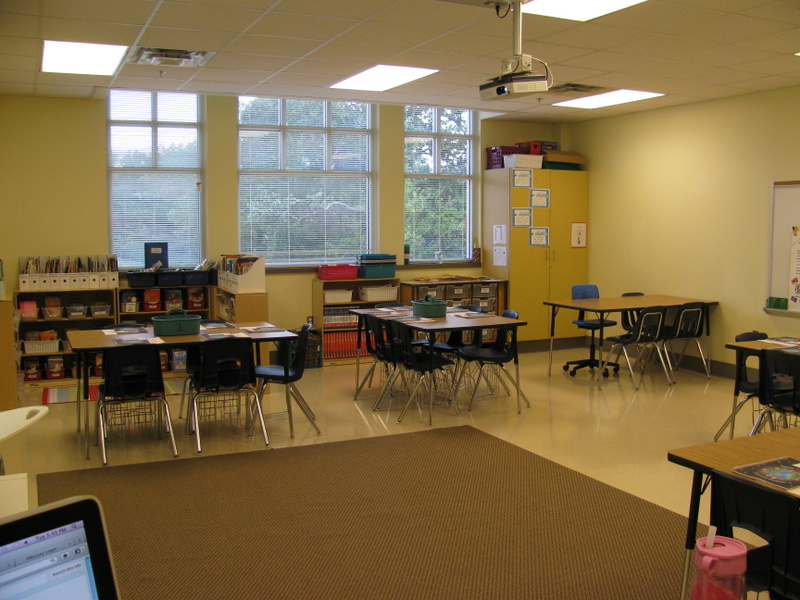
Well, I've now completed 3 days with my students, and I'm already excited about where the year is headed! I'll be sharing several tidbits in the next few days about how I've set up my classroom this year and what we did during the first few days of school, but for now, I promised I'd give a tour of my classroom. Here's how it looked moments before the parents arrived for our back to school meet and greet last Tuesday night.


I created a display of balloons with my students' names on the door outside my classroom to welcome them to Eberopolis. I ended up having 25 students to start this year, but there's always a possibility that I'll add more. 

When you walk into the classroom, this is what you would see:


I love those windows! They add so much light to my classroom. On your immediate right is my word wall. 


Last year, I didn't have a word wall, and I really missed having it to refer to. It's great to use for sponge activities and review. I've been making a lot of word wall cards to use there this year, and we've been adding  words every day since school started. 

Next is my behavior clip chart.
So far, it has been working really well. Last year, I didn't have the opportunity to have students move up and down -- there were only four colors, and they were done on cards in a pocket chart. This system allows me to focus more on the positive behaviors, and I'm integrating it with my class economy

Here's a better view of the entire back wall (taken from my desk area):

On my whiteboard, I have a few things hanging up or resting on the ledge.

There's my homework magnet -- a VistaPrint creation -- along with some days of the week magnets I picked up from Target.

I also have my "Missing Homework Log." Each student has a page in this, and anytime they forget an assignment, they have to write it down and write down the reason they don't have it to turn in on time. (I saw this originally on Pinterest, but now I don't know where the idea originated...if it's yours, let me know so I can give you credit!) This builds accountability and is handy for me when I have to go back at the end of the term and figure out who consistently forgets their homework so I can share that with parents in report card comments.

I had a few items that I wanted donated to the classroom, so I had this displayed at the Meet & Greet. Most of the apples were taken by the end of the night. 

Moving on to the back corner of my room...
I'll be using that back table to meet with small groups this year. By the end of the Meet & Greet, the table and the surrounding floor space was buried in school supplies that parents dropped off. 

The cabinet behind the table locks and houses my class laptops and some science materials. 
It also displays my student self-assessment posters.

Beside the cabinet is one of my two rolling tables.
For the Meet & Greet, this is where I put the sign-in sheet and handouts that needed to be sent home. Normally, however, this is where students will make their lunch choices in the morning and turn in papers.

Between the two carts (one on each side of the room), I have 24 drawers. This is a little inconvenient given that I have 25 students, so I decided to change my system this year. Rather than giving each student a drawer and relegating one to a plastic basket on the side, I decided to organize the drawers by teams and subjects.
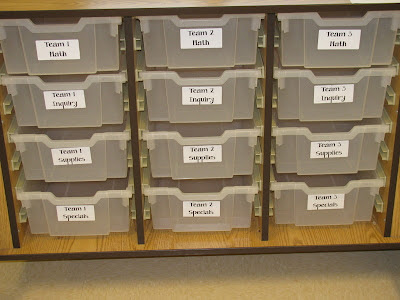
I have 5 tables/teams, and each team gets 4 drawers. The math drawer contains their math journals, any manipulatives they may need, and any math work-in-progress. The inquiry drawer is for their inquiry notebooks and any science or social studies materials they're using. The supply drawer holds general supplies like glue sticks, scissors, and colored pencils -- supplies we use frequently, but not so frequently that I'd want them out on their tables all the time. The last drawer is for specials. That's where they'll keep their music folders, Spanish notebooks, and anything else they need for Art, PE, Music, or Spanish. So far, I love this new system. It lets me pass out some materials in advance -- I can put math manipulatives for the day in each team's drawer, for example, before we get to the lesson. It also meant that I had 4 extra drawers left over which is very handy for storing all of the supplies that students brought in. 
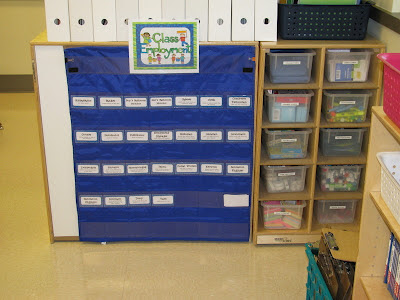
Beside the cart is a bookcase for textbooks and reference books, a bin for our clipboards, and then a supply cart and our class jobs board. The supply cart holds things such as calculators, sticky notes, highlighters, index cards, flash cards, dry erase markers, and a few other small things that I want students to be able to access as needed. For our job board, I had students apply for jobs last week, and I took a picture of each student on the first day. Once I decide on the jobs for this term, I'll put their picture in the pocket chart behind the job that they're assigned to.

Behind my job chart is my classroom library.
Last year, it was flat against the wall, but this year, I built it as a little nook inside our classroom. The bins on the top shelf hold mostly non-fiction books. The shelves below it hold books sorted into categories such as favorite authors, favorite series, and genres. Students can borrow and take home two books at a time, and they sign out their books in library checkout folder. At some point, I want to create an electronic checkout system for my classroom, but I haven't had time to work on that yet.

Looking toward the front of my classroom, you'd see this:
We have a large carpeted area for class meetings and lessons at our ActivBoard. To the right of the ActivBoard is my class schedule pocket chart, and I'll be decorating the green bulletin board for our first Unit of Inquiry. My Writer's Workshop wheel hangs underneath my ActivBoard, and then I have my calendar math board and reading/writing materials to the left of the ActivBoard.

Here's a close-up view of that:
Each student has a book bin to hold reading notebooks, writing notebooks, and any books they're reading. Last year, the bins were on the floor, and I hated it, so I decided to splurge on a shelf from Ikea. Already I am far happier.

You can also see my desk -- the neatest it will be all year, I'm sure, and my teacher resource bookshelf behind it. 

Here's what the full wall looks like from my classroom library nook:
From this angle, you can also see my filing cabinet, my second storage cabinet, my student mailboxes, and my other rolling table. I plan to decorate that side of my room more, but I just haven't gotten to that yet. There doesn't seem to be enough hours in the day!

So there you have it! A complete tour of Eberopolis as seen by my new students and their parents at the Meet & Greet last week. 

If you have any questions about something I forgot to talk about, let me know in the comments. I'm pretty happy with my classroom layout this year, so I'll be happy to share.

Until next time,
Related Posts Plugin for WordPress, Blogger...