Sunday, June 30, 2013

Tune Into Technology Linky: Integrating Technology into Reading

I'm excited to be linking up with iTeach 1:1 and Learning to the Core for their new series Tune into Technology. This week's topic is Integrating Technology into Reading, so I wanted to share 5 strategies I use to do this.

1. Let kids annotate their reading with GoodReader.


I've talked about this app before, but it's one of my favorites. GoodReader allows you to annotate pdf documents. I use it for almost all of my professional reading, and I've converted several documents into pdfs for my students as well. It's a fantastic tool because my students are able to leave "think marks" all over their reading, and I don't have to worry about them writing in a book or leaving sticky notes everywhere. We've even developed our own codes for how to use the annotation tools.


2. Share favorite books on KidBlog.


My students LOVE sharing the books they're reading on KidBlog, and they especially love reading and commenting on each other's blogs. I've talked more about how we do this in a previous post.

3. Create Book Trailers in iMovie.


Some of my students began doing this for fun at the end of the school year when we became a 1:1 iPad classroom, and I will definitely be doing this more next year. iMovie has some great templates built-in for this, and my students loved being able to share their favorite books through this medium.

4. Create book clubs and discussion groups on Edmodo.


We started using Edmodo at the end of the school year, and it was a great way to get conversations started or keep them going about the books we were reading in class. You can read more about getting started with Edmodo in my paperless series here.

5. Use Evernote and GoodReader to assess reading.


I use the running record templates from the Reading & Writing Project at Teacher's College. Because they're pdf files, I can annotate them in GoodReader, and I can record students while they're reading in Evernote. I've written a complete tutorial on how to do this here.

How do you integrate technology into reading instruction in your classroom? I'd love to hear your ideas. And be sure to link up with the Tune into Technology linky!

And don't forget to join us for the Southeastern Blogger Meet Up. Click the button below to get the details and RSVP!


Saturday, June 29, 2013

July Currently & Goals & a Meet Up!

Oh, July! You seemed so far away a month ago. How could you possibly be almost here already?! Can't we add another month in between June and July? I really, REALLY want to hold on to June as long as possible. I'm really not ready to return to work in a few weeks...

Currently July

I'm linking up with Farley at Oh Boy! 4th Grade for the July Currently.


Listening: My little girl is almost 2, and she LOVES books. She also loves Pete the Cat. I took her to my favorite children's book store, Little Shop of Stories, to get the new Pete the Cat book the day it came out. Given that she knows and loves the song "Wheels on the Bus," it's a great book for her to "read" on her own.

Loving: Planbook.com. I signed up for the one-month trial to tinker around with it, and it's fantastic. I'll definitely be using it next year.

Thinking: that I'm much more prepared to teach the Common Core this year -- especially with math. I'm excited about implementing all of the things that I worked on this summer to get ready for math, and I'm optimistic about my year ahead.

Wanting: a longer summer break. There are so many things that I still want to do before going back to school, and I don't think I'm going to be able to get them all done.

Needing: a maid. I can't keep up with my husband, toddler, and two dogs. Once I go back to work, it may be time to hire someone to come in each week.

Tips, Tricks & Hints: One thing that helps me with time management is to try to group all of my like-projects together and work on them at once. For example, I have one day a week at school that I do all of my copying (or at least I did before going paperless!). I also spend one day working on plans for each subject (e.g., a day for math planning, a day for science, etc.) and a day for working on blog posts, etc for the week. This helps me use my time more efficiently and stay relatively organized.

July Goals


I'm also linking up with Jess at I {Heart} Recess for the first time for the monthly goals post.


Personal: I want to start exercising at least 3 times a week (baby steps). I return to work in a couple weeks (!), and I know with all that I'll be juggling this year between work and my doctorate that I will need to do better with exercise for balance and stress management.

Family: I want to squeeze in a couple more "date days" before going back to school. My daughter is in school year round, so on "date days," my husband leaves his office before lunch, and then we go out to lunch and catch a movie before picking her up. It saves us babysitting costs, and it's a fun way to spend our afternoon.

Health: A few years ago when I lost a lot of weight, the biggest change I made was that I consistently drank 64 oz of water every day. Now that I've gained back the weight (and then some), I need to start drinking at least that much water every day.

School: I report to our staff retreat on July 17th, and then pre-planning officially starts on July 25th. I need to figure out how I'm going to decorate my room before then and map out some plans for the first few weeks before then.

Blog/TpT: I'm hoping to wrap up my Paperless Challenge series in the next few weeks, and I have several new TpT products in the works. This summer has just gone by too quickly for me to finish it all!

Outside the Box: I want to find some easy and tasty breakfast and lunch recipes that I can use throughout the year. I do a fairly good job cooking healthy dinners, but I am not consistent the rest of the day. I often forget to eat breakfast, and then I don't make the best choices for lunch either. The more I plan ahead, the better prepared I'll be. And this justifies spending more time on Pinterest. Win-win!

Southeastern Bloggers Meet Up!

Have you heard about the Southeastern-area blogger meet up? It's about time that those of us in Georgia and the surrounding areas get together, and I'm super thankful that Stacia, Amanda, and Jivey from Collaboration Cuties and Ideas by Jivey have  organized something for us. If you are close to Atlanta, I hope you'll join us for the meet up on July 20th. It promises to be lots of fun.

Click on any of the images below to connect with Jivey's blog where you can RSVP.


I hope to meet lots of other fabulous teacher bloggers there! Click the button below to RSVP.


Friday, June 28, 2013

Math Resources for Teachers

It has been a whirlwind couple of weeks! I went on a mini-vacation to a wedding in Nashville, and then I attended a 3-day workshop on The Role of Mathematics in the International Baccalaureate Primary Years Programme. I think this is the summer of math learning for me! I love attending workshops because I almost always leave with new ideas and new resources to explore. Even if you don't work at an IB school, there were lots of useful resources worth exploring.

(Apologies in advance -- this will be a long post!)

Book Resources


A Mathematical Passage: Strategies for Promoting Inquiry in Grades 4-6


This book was featured because of it's Mathematician's Bill of Rights on p. 139. The Bill of Rights lists the "rights" that all mathematicians have -- things like "solve problems in ways that make sense to me" and "capitalize on mistakes as sites of learning." I'm definitely interested in reading more from this book. I've read other things by David J. Whitin before, and they've been great.

Math Matters: Understanding the Math You Teach Grades K-8


I had a chance to browse this book during the workshop, and it looks like a good one for understanding how to approach math conceptually. May not be the most exciting read in the world (would you look at that front cover?!), but it looks like a very useful book if you're going for an inquiry oriented math classroom.

Good Questions for Math Teaching


This book is great for creating open-ended questions that will really get students thinking about the math involved in problem solving rather than just looking for a specific answer. It uses questioning techniques to develop more sophisticated mathematical thinking, and it has a wealth of information.

Number Talks


I was a little surprised how many teachers at the workshop were already familiar with this book and using it given that I'm usually up on all the latest and greatest math books, but nevertheless, this book had rave reviews. Of all the books that I'm reading this summer, this is the one that I suspect will have the biggest impact on my teaching this August. I've really enjoyed reading it, and I have so many ideas about how I will put it into practice this year. If you haven't gotten it already, I couldn't recommend it more!

Good Questions: Great Ways to Differentiate Mathematics Instruction


I know I've talked about this book before, but we spent a lot of time talking about open questions and parallel tasks at the workshop, so I had to share this book again. I used this book non-stop at the end of the school year, and I loved how it was so perfectly aligned to Common Core in math. It couldn't be more teacher-friendly.

Online Resources


Visible Thinking Routines

I've been introduced to the Visible Thinking Routines from Harvard's Project Zero before, but it was good to be reminded about them. These are some great activities to prompt student discussions and thinking. One example of this is "OTQ - Observe, Think, Question." For this activity, students see a picture and spend a few minutes describing what they see/observe. Anything they observe has to be rooted in the picture and not based on inferences. Step 2 is "Think" - what does this make you think about? This is where students can share their inferences and cite evidence in the picture to support why they think that. Finally, students "question" and share what they wonder about based on the picture. I like that these routines slow down student thinking.

We watched this video in the workshop, and if you've never seen it, I highly recommend that you take the 10 minutes to watch Dan Meyer's TED Talk. In it, he talks about the problems with current approaches to math instruction -- largely fueled by larger textbooks and math programs -- and how to turn those materials into the types of problems that will challenge your students to become patient problem solvers. I was really inspired by this video, and I hope that you will be, too.

Have a great weekend! I'll be back to blogging more regularly next week!


Disclosure of Material Connection: Some of the links in the post above are "affiliate links." This means if you click on the link and purchase the item, I will receive an affiliate commission. Regardless, I only recommend products or services I use personally and/or believe will add value to my readers. I am disclosing this in accordance with the Federal Trade Commission's 16 CFR, Part 255: "Guides Concerning the Use of Endorsements and Testimonials in Advertising."

Monday, June 17, 2013

Overwhelmed, you say? How to Cope

Despite being on the planet for 30+ years, I still don't seem to have the concept of time worked out. I came to this realization last night as I compared my summer to do list against my calendar. Yikes! Honestly, the number of lesson plans I'd intended to write, TpT products I'd hoped to create, and professional books I planned to read were more than I could probably accomplish in a year much less a summer break.

Here are some tips I try to remind myself when I get into these stressful predicaments.

1. Delegate and negotiate 
There are some things that I have to do because no one else can do them for me (e.g., write my blog, research for my doctoral program, etc.), but there are plenty of items on my perpetual to do list that could be delegated or outsourced. For example, my husband and I hate to do yard work -- especially during the hot and humid Georgia summers. We could suck it up and commit the time, or we could pay someone to do it for us. We opt for the latter because the free time we gain is more valuable than the money we spend. When I get going with my doctoral program this fall, we'll likely hire a maid service for the same reason. The trick is to go through the to do list and determine how much of it has to be done by me and how much of the list could be done -- even partially -- by others. Using TpT for lesson plan assistance is another great example of delegating.

I also negotiate for free time on the weekends. I have an amazing daughter who's almost 2. I love hanging out and playing with her, but she's also at an age where she's a lot of work. When I have an overwhelming to do list, I try to negotiate free time with my husband where he'll take Syd for a couple of hours so I can work distraction-free, and then I'll reciprocate later in the day. Often he'll take her out of the house to run errands or get groceries so I can really get a lot done. It's been incredibly helpful to chunk out time like that and know that I'll have it.

2. Consider worst-case scenarios
Often the stress we feel is self-imposed, and it helps to gain a bit of perspective. What's the worst-case scenario if I don't finish making all of the TpT items I want to create this summer? Certainly nothing catastrophic. Often it's the same case with the stack of papers waiting to be graded during the school year. Looking at my to do list through this lens helps me see what's really important. It's not a blank check to delay work indefinitely, but it's helpful when there's a lot going on and too many balls to juggle at once.

3. Prioritize and minimize
Sometimes the sheer sight of my to do list can cause me to tense up and feel overwhelmed. One strategy I use to combat that is to rate the items on my list using a scale that reflects the urgency and the importance. Then I make smaller to do lists with the 3-5 items I want to accomplish in a day. This helps me stay calm and feel productive while avoiding the pressure of my long-term, substantially larger to do list.

Another helpful tip that I picked up somewhere was the two-minute rule. If something comes to me that I can take care of in 2 minutes or less (e.g., an email), I try to do it right then and not put it off. Otherwise, my inbox becomes cluttered and that's one more thing stressing me out. Filing or scanning papers is a similar example.

4. Focus on one thing at a time
One of the biggest time sucks that happens to me is that I try to do too many things at once, and I forget that "multi-tasking" isn't always more efficient. It helps me if I chunk like activities together and really get focused. For example, I try to spend a lot of time working on my blog on Mondays so that I can get posts written and scheduled for the rest of the week. I rarely finish all of my posts, but I'll at least know what I'm going to write about and have a skeleton draft done so that it will take less time the rest of the week. I dedicate another day to all of my cleaning and errand-running, a day to focus on reading/lesson planning, etc. I also try to have a day with nothing scheduled so I can relax and hang out with my family. During the school year, that's usually a Saturday or Sunday, and even if I can't clear out the whole day, I'll set a rule that I'll stop working by noon or only work after my daughter has gone to bed. It helps.

5. Shut down the distractions
This is the hardest thing for me because I often have email, Facebook, and Twitter open while I work, and then there's Feedly and Pinterest which can become huge time sucks, too. Lately, I've found it helpful to close out of those tabs and use a timer app. For example, I'll work on something for an hour, and then as my reward for being productive, I'll allow myself 15 minutes on Pinterest. The timer helps me avoid slipping down the rabbit hole of lost time.

What are some strategies you use to help you when you're feeling overwhelmed or overcommitted? I'd love to hear more ideas in the comments. 

And as a side note, have you checked out the Teacher Toolbox Trio lately? The giveaway is over, but I decided to keep the linky going for a while because there were still teachers who wanted to share. And honestly, how I could possibly resist the opportunity to see what other teachers love and add to my own wish list? If you haven't linked up yet, I'd love to have you join the fun!


Follow my blog with Bloglovin

Saturday, June 15, 2013

Giveaway Winner!

I had so much fun seeing what everyone posted in the Teacher Toolbox Trio linky. Thanks to everyone who linked up.


I went to the Random Number Generator this morning, and drumroll...


I'm excited to announce that Stephanie Ann from Sparkling in Kindergarten was the winner of the $25 Teachers Pay Teachers gift certificate. Congratulations, Stephanie Ann!


And welcome to all of my new followers! I have lots that I look forward to sharing this summer.

Have a great weekend!

Thursday, June 13, 2013

Why Teachers Love Technology

An infographic about "Why Teachers Love Technology" was recently shared with me, and on the heels of yesterday's post, I felt like now is a good time to share the infographic with you.

What do we Know Infographic
Graphic from OnlineUniversities.com

Do you love technology? I'd love to hear why in the comments section!

Wednesday, June 12, 2013

In Defense of Classroom Technology

Usually when I talk to people about the fact that I teach in a 1:1 iPad classroom, they think that's awesome. But now and again, I'll run into someone who thinks handing a kid an iPad in school is an atrocity, and I feel like I have to defend the work that I'm passionate about. This happened to me recently at a social event when my attempts at small talk quickly turned into a debate about what we're "doing to kids today." The naysayers certainly exist, and this particular encounter made me pause to think about why I feel so strongly about this topic.

Here are some of the reasons I feel it's in the best interests of both students and teachers to maximize the use of classroom technology.
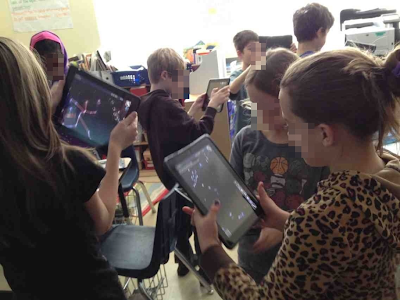
My students explore constellations on their iPads.

1. It teaches real-world problem solving skills.
Being good at technology is largely a result of being willing to experiment and fail. I wasn't born knowing everything there is to know about iPads or Evernote or Edmodo -- I've learned by trying different things and seeing what worked and what didn't. When I can't figure it out on my own, I talk to others or look for the information I need online. Now I get to see these skills in my students. Whenever they need to troubleshoot something, they work together to find a solution. They don't give up or think it's impossible. In this high-tech world, these skills are going to be incredibly valuable.

2. It facilitates better communication between home and school.
If parents want to know what we're doing in class each day, they can find all of our homework and activities on our class website. If they want to monitor grades or see what assignments are missing, they can look on Edmodo. If they want to know what their child's behavior was like at school today, they can look on ClassDojo and get a report. If they want to know what their child sounded like reading a 4th grade leveled text at the beginning of the year compared to now at the end of the year, I can pull up the child's audio recordings on Evernote. Technology makes it easier for parents to know what's happening in school, and I'm happy about that.

3. It makes students better writers.
Without question, writing skills are incredibly important. When I think back on all of the essays I had to write in high school and college or the cover letters I wrote to get opportunities I have today, I know that my ability to write mattered. Technology makes students better writers for a variety of reasons:
  • It makes them more open to revising and publishing their work when they don't have to handwrite the whole paper over again.
  • It teaches them typing skills that will make them more efficient at writing and therefore able to write more. 
  • It gives me more opportunities to give them feedback about their writing because I can easily collect samples at various points. I can have them turn in a copy of a draft wherever they're at without interrupting their work because I don't have to collect a notebook. 
4. It keeps kids engaged.
I used to have students write book reports. Now I have them write book blogs on KidBlog and make book trailers using iMovie. It's basically the same assignment, but now students are motivated and engaged to complete it. They have an audience of their peers that makes their work more authentic, and it's something that can't be easily replicated without technology. The effort and outcomes my students experience because of technology is something that should be encouraged.

5. It benefits all types of learners.
I think a lot of the criticisms of technology assume that students are being passive consumers of it -- watching videos or playing video games all of the time. Without question, technology could be used as a high-tech babysitter, but that's not how it's being used in my classroom at all. When my students use their iPads, they are active and interactive, and they're expressing their creativity in so many ways now. They're making movies, writing stories and articles, becoming budding photographers, and interacting with the world and each other in new and exciting ways.  They're still collaborating and developing the interactive social skills necessary to be productive citizens of society.

6. It keeps everyone more organized.
I can't begin to describe how many minutes I've lost over the last 6 years because students couldn't find a paper or a notebook. Then once it was turned in, I'd have to shuffle through piles of nearly 30 to find what I was looking for. Add to that the fact that students work at different rates and finish tasks at different times, and you have the potential for an organizational nightmare.

I'm a pretty organized person, but without any hesitation I can say that technology has made my students and me substantially more organized. Everything we need can be found on an iPad or a computer. There isn't instructional time lost finding materials or planning time lost figuring out where I filed that lesson idea or who is missing work. It's all in one spot.

7. It allows me to give better feedback.
My students recently took a multiple choice test on Edmodo. I'd entered the correct answers before giving the test, so when I went to look at the results, it was already graded for me. Rather than spending time rifling through a pile of papers to mark answers right or wrong, I was able to type specific feedback to the students. For example, when several students missed question #6, I typed 2 sentences explaining the problem with the answer choice they selected and why the other choice was better. With the help of copy and paste, I was able to give that feedback to all applicable students in less than 5 minutes. How often do you think I could accomplish that in a world where I had to handwrite the comment 15+ times? It wouldn't happen. I wish it could, but it's not feasible.

8. It gives me more information so I can help students.
I routinely ask my students to solve math problems and explain their thinking. Sometimes they have to explain it in words and sentences, but other times I let them use their iPads to make short (30-60 second) videos narrating their solutions and the steps they took. Similarly, when I do reading assessments with students, I can use my iPad to record the student's voice as the student reads. This creates an artifact that I can listen to, share with parents or RTI committees, and analyze in a way that wouldn't be possible absent technology. It's some of the best evidence of a student's ability, and it helps me identify strengths and weaknesses so I can give students the support they need.

9. It makes me more efficient.
Anyone who's a teacher can attest that this job sometimes borders on impossible. Teachers take on so many roles and have so many responsibilities that the stress can be overwhelming. I think that's a major factor in why so many great teachers leave this profession within the first few years and why many capable individuals are deterred from entering the field. In my experience, technology has made this all more bearable. I don't have to waste time shuffling through paper or hunting for files anymore. I don't have to haul carts -- literally carts -- of student work and planning materials home anymore. I can find exactly what I need wherever I'm at because everything is electronic. It's made me much more productive and efficient, and everyone benefits as a result.

10. It's appropriate for the world we live in.
I know a lot of people lament the fact that we've moved into an age of technology. I'm not one of them, but even if I were, I recognize that there's no going back now. I'd rather introduce students to technology in safe, structured ways where I can guide them through the perils and pitfalls than leave them to struggle on their own. I also like that I can show them how to make technology work effectively for them. I'm facilitating students to be productive, creative, and responsible users of technology, and I'm not confident they'd all get there on their own.

It's not technology that's an issue -- it's how the technology is being used. I'm certain that the ways my fourth graders use their iPads will make them better informed, more capable citizens down the road. Is it the only way to teach them? Absolutely not, but the advantages of using technology in the classroom far outweigh any disadvantages the devices bring.

What are the arguments for or against using technology in the classroom that you've heard? I'd love to hear your thoughts in the comments.

Related Posts Plugin for WordPress, Blogger...